
Using Stock Screeners: Pre-Built Strategies and Custom Filters
Find stocks that match your investing style using famous-investor strategy screens or build your own custom screen with up to 10 filters.
Last updated July 6, 2026
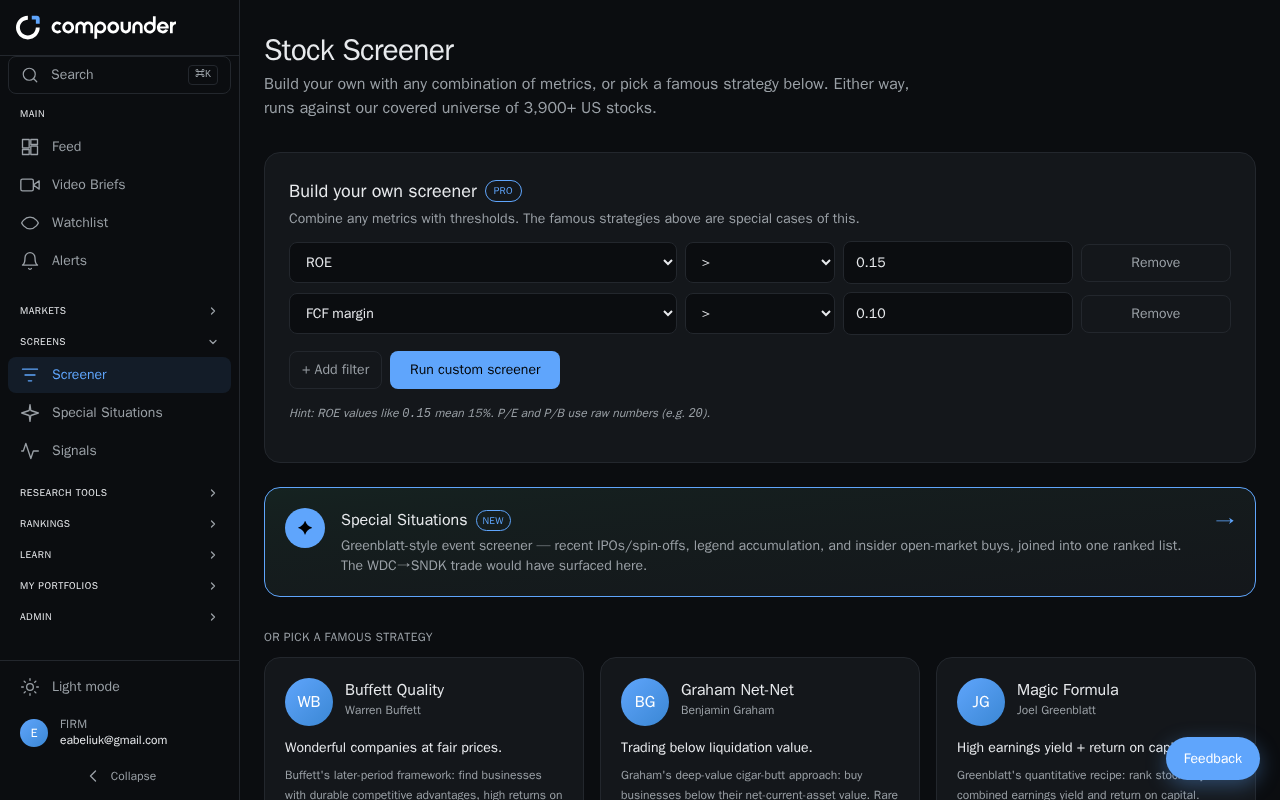
Overview
The Stock Screener helps you discover stocks that fit specific investment criteria — without manually researching thousands of companies. There are two ways to use it: run a pre-built strategy based on a legendary investor's philosophy, or build your own custom screen by stacking multiple filters. Both approaches search a universe of 3,900+ US stocks and return a ranked list of matches you can explore further.
Pre-Built Famous Strategies
If you want to get started quickly, the Pick a Famous Strategy section offers ready-to-run screens inspired by well-documented investment philosophies. Each strategy card shows the creator's name, a plain-English description of the approach, and the criteria behind it.
Available strategies include:
- Buffett Quality — focuses on high-quality businesses trading at fair prices
- Graham Net-Net — targets stocks trading below their estimated liquidation value
- Magic Formula — ranks stocks by earnings yield and return on capital
- Lynch GARP — growth at a reasonable price (requires a Pro subscription)
- Dividend Aristocrats — companies with 10 or more consecutive years of dividend increases (requires a Pro subscription)
Some strategies are only available on a Pro plan. If you are on a free plan, you will see an upgrade prompt when you try to run those screens.
How to run a pre-built strategy
- Navigate to the Stock Screener section.
- Browse the strategy cards under Pick a Famous Strategy and read the descriptions to find one that matches your style.
- Click Run on the strategy you want to execute.
- Review the results — up to 25 matching stocks, ranked by relevance score.
- Click any ticker in the results to open that stock's full profile, where you can research further and decide whether to add it to your watchlist.
Custom Stock Screener (Pro Feature)
If none of the pre-built strategies match your exact criteria, you can build your own screen from scratch. The custom screener is a Pro subscription feature. Free users will see an upgrade prompt when they open this section.
You can stack up to 10 filters, mixing and matching metrics such as ROE, P/E, Debt/Equity, FCF margin, P/B, and Earnings yield. For each filter you choose a metric, an operator (such as greater than, less than, or equal to), and a target value — for example, ROE greater than 15%, Debt/Equity less than 0.5, and FCF margin greater than 10%.
How to build and run a custom screen
- Navigate to the Stock Screener section.
- Open Build Your Own Screener. If you are not on a Pro plan, you will be prompted to upgrade.
- Click Add filter and select your first metric from the list (for example, ROE).
- Choose an operator and enter a value (for example, greater than 15).
- Repeat the previous two steps to add more filters — up to 10 in total.
- Click Run the screen to execute your search.
- Review the results — up to 50 matching stocks, each showing a ticker and a Score (higher score means a stronger match).
- Click any ticker to open the full stock profile.
Tip: If your screen returns no results, your combined filters may be very strict. Try relaxing one or two thresholds to broaden the search.
Working with Your Results
Whether you used a pre-built strategy or a custom screen, every result is clickable. Clicking a ticker takes you to that stock's full profile page, where you can review detailed financials, charts, and analysis — and add the stock to your watchlist if it looks promising.