
Setting Up and Managing Custom Alerts
Learn how to create alert rules, choose notification preferences, and manage your alert inbox to stay informed when stocks meet your investment criteria.
Last updated July 6, 2026
Overview
The Alerts section lets you create custom rules that automatically watch stocks, themes, and investment legends for specific conditions. When a condition is met, an alert appears in your Inbox and, optionally, is sent to you by email. This guide walks you through creating alert rules, understanding each alert type, and managing your inbox.
Navigating the Alerts Section
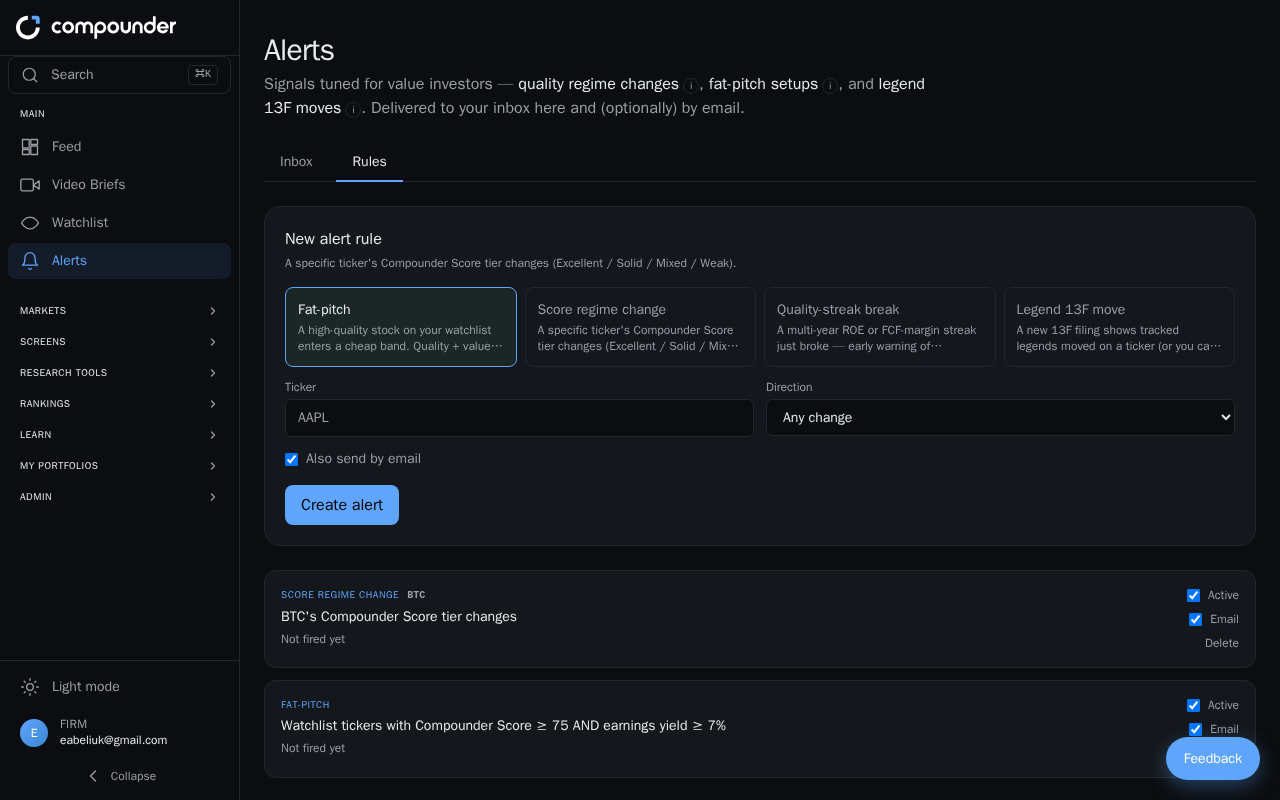
The Alerts section is divided into two main tabs:
- Inbox — where triggered alerts appear as notifications.
- Rules — where you create and manage the conditions that generate those notifications.
Creating a New Alert Rule
- Go to the Alerts section and open the Rules tab.
- Click Create a new rule.
- Select one of the available alert types (described below).
- Configure the parameters for that alert type — for example, which stocks to monitor, a minimum quality score, or a valuation threshold.
- Toggle the Active checkbox to enable the rule.
- If you want to receive email notifications when the alert fires, toggle the Email checkbox on.
- Save the rule. It will begin monitoring immediately.
You can return to the Rules tab at any time to edit, pause, or delete any rule. Each rule displays a summary of its criteria and when it last fired.
Alert Types
Fat Pitch
This alert watches your watchlist for stocks that combine a high Compounder Score (quality) with an attractive valuation (earnings yield). It fires when a stock meets both thresholds at the same time — a rare combination of quality and value. A 30-day cooldown prevents the same stock from triggering duplicate alerts within a short period.
When creating this rule, you set your preferred quality and valuation parameters, then choose your notification preferences.
Score Regime Change
This alert monitors a specific stock's Compounder Score tier — Excellent, Solid, Mixed, or Weak. When the stock moves up or down between tiers, the alert fires. This helps you stay informed when a company's fundamental quality profile shifts meaningfully.
When setting up this rule, select the stock you want to monitor and your notification preferences.
Quality Streak Break
This alert fires when a stock's multi-year profitability streak — tracked by either Return on Equity (ROE) or Free Cash Flow (FCF) margin — comes to an end. When creating this rule, you specify which stocks to monitor and which streak metric matters to you.
Legend 13F Move
This alert notifies you when tracked investment legends file new 13F documents that involve stocks you follow. It helps you keep up with the latest moves from investors you watch.
Theme Breakout
This alert fires when a stock within a theme reaches a quality score threshold you set. You configure the quality score target when creating the rule.
Choosing How You're Notified
For any rule, you can receive alerts in-app (in your Inbox), by email, or both:
- Toggle Active on to enable the rule.
- Toggle Email on to also receive email notifications when the alert fires.
- You can change these toggles at any time without deleting the rule.
Managing Your Alert Inbox
The Inbox tab displays all alerts triggered by your active rules. Each alert shows:
- The signal type (for example, Fat Pitch or Quality Streak Break)
- The stock ticker involved, with a clickable link to that stock's detail page
- A title and description explaining what triggered the alert
- Timestamps for when it was created and whether it was emailed to you
To stay organized, you can:
- Filter by Unread or All to focus on new signals or review your full history.
- Mark individual alerts as read, or click Mark all read to clear all unread items at once.
- Archive alerts you no longer need in your active inbox.
- Share an alert with others using the Share button, which generates a public share page.
Tips for Getting the Most from Alerts
- Use the Active toggle to pause rules temporarily without losing your settings — useful if you want to take a break from a particular signal.
- The 30-day cooldown on Fat Pitch alerts is automatic and helps prevent alert fatigue for frequently watched stocks.
- Check your Rules tab regularly to review when each rule last fired and adjust parameters if needed.