
Managing Your Account Settings
Update your profile, verify your email, set your investment preferences, and control how often you receive your research digest.
Last updated July 5, 2026
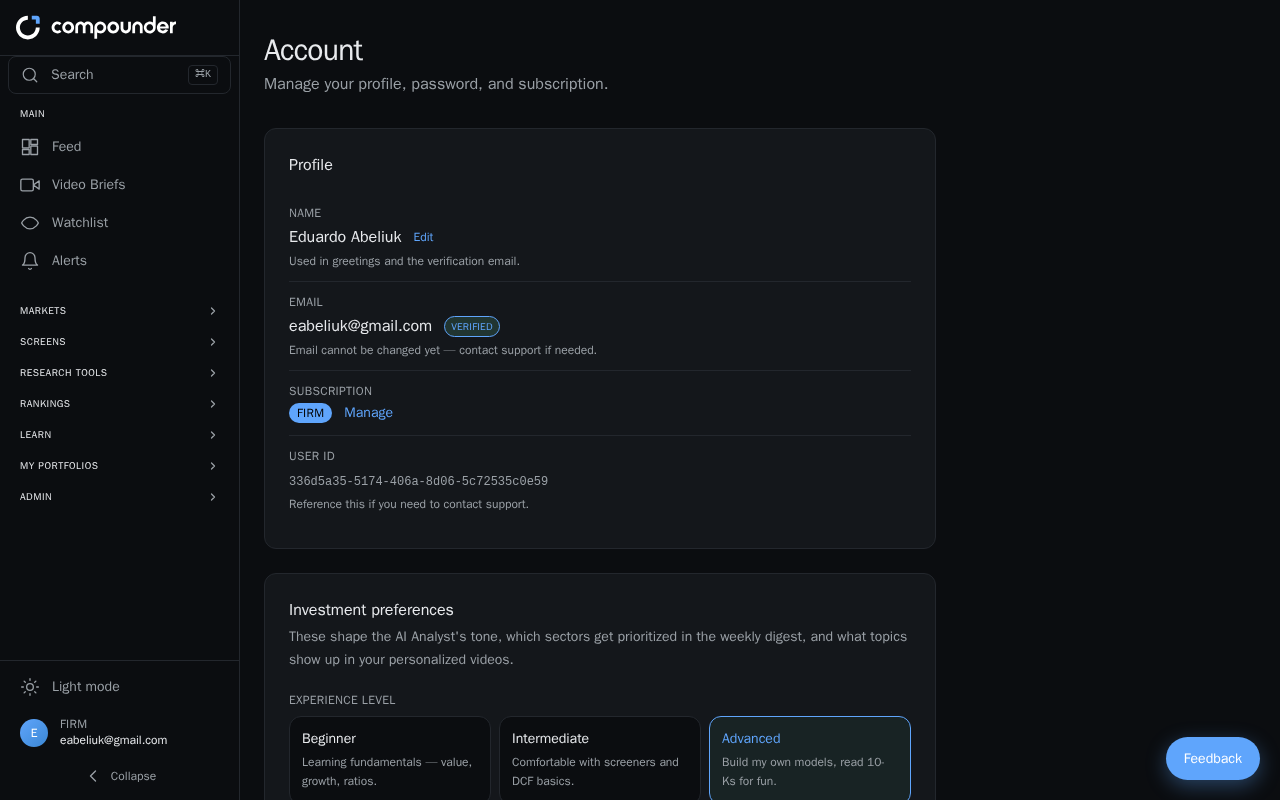
Getting to Your Account Settings
All account settings live in one place. Open the profile menu in the top navigation bar and select Account. From there you'll find several sections: Profile, Preferences, Brief Delivery, and Change Password.
Your Profile: Name, Email, and Subscription
The Profile section shows your registered name, email address, current subscription plan, and a User ID you can share with support if you ever need help.
- Changing your name: Click Edit next to your name to update it. Your name appears in greetings and any verification emails sent to you.
- Email address: Your email is shown here along with a Verified badge once it has been confirmed. If you don't see that badge, see the section below on verifying your email.
- Subscription: Your current plan (Free or Firm) is displayed here, along with buttons to Upgrade your plan or Manage your existing subscription.
Verifying Your Email Address
A verified email ensures you receive important account communications and your research digest without interruption.
- Go to the profile menu in the top navigation and select Account.
- In the Profile section, check your email address. If it doesn't show a Verified badge, click Resend verification email.
- Check your inbox for the confirmation message and click the link inside it.
Clicking the link takes you to a verification page that processes your confirmation automatically. You may see one of three outcomes:
- Verifying — a brief loading state while your email is being confirmed.
- Email verified — success. Click Go to dashboard to enter your main workspace.
- Verification failed — the link may have expired, already been used, or been invalid. Click Go to account → resend email to request a fresh verification link from your account settings.
Personalizing Your Investment Preferences
The Preferences section lets you build an investment profile so the platform can surface content and recommendations that match your goals. You can set:
- Experience level — for example, Beginner, Intermediate, or Advanced.
- Risk tolerance — your comfort level with market volatility.
- Time horizon — how long you plan to stay invested.
- Sectors of interest — the industries you want to follow.
- Investment strategies — the approaches most relevant to you.
- Video topics — subjects you'd like covered in educational video content.
All preference changes save automatically as you make them — no need to click a save button.
Choosing Your Research Digest Delivery Schedule
The Brief Delivery section controls how often you receive your personalized research email.
- Weekly — delivered every Sunday.
- Daily — delivered every day at 11:00 UTC. This option is available on the Firm plan only.
To change the setting, scroll to the Brief Delivery section on the Account page and select your preferred frequency. Your choice takes effect immediately and saves automatically.
Changing Your Password
In the Change Password section, enter your current password followed by your new password (at least 8 characters). When you're done, click Update password. A confirmation message will appear once the change has been saved.