
Exploring Model Portfolio Recommendations
Discover four pre-built model portfolios, review their holdings and rationale, and bulk-add stocks to your watchlist.
Last updated July 6, 2026
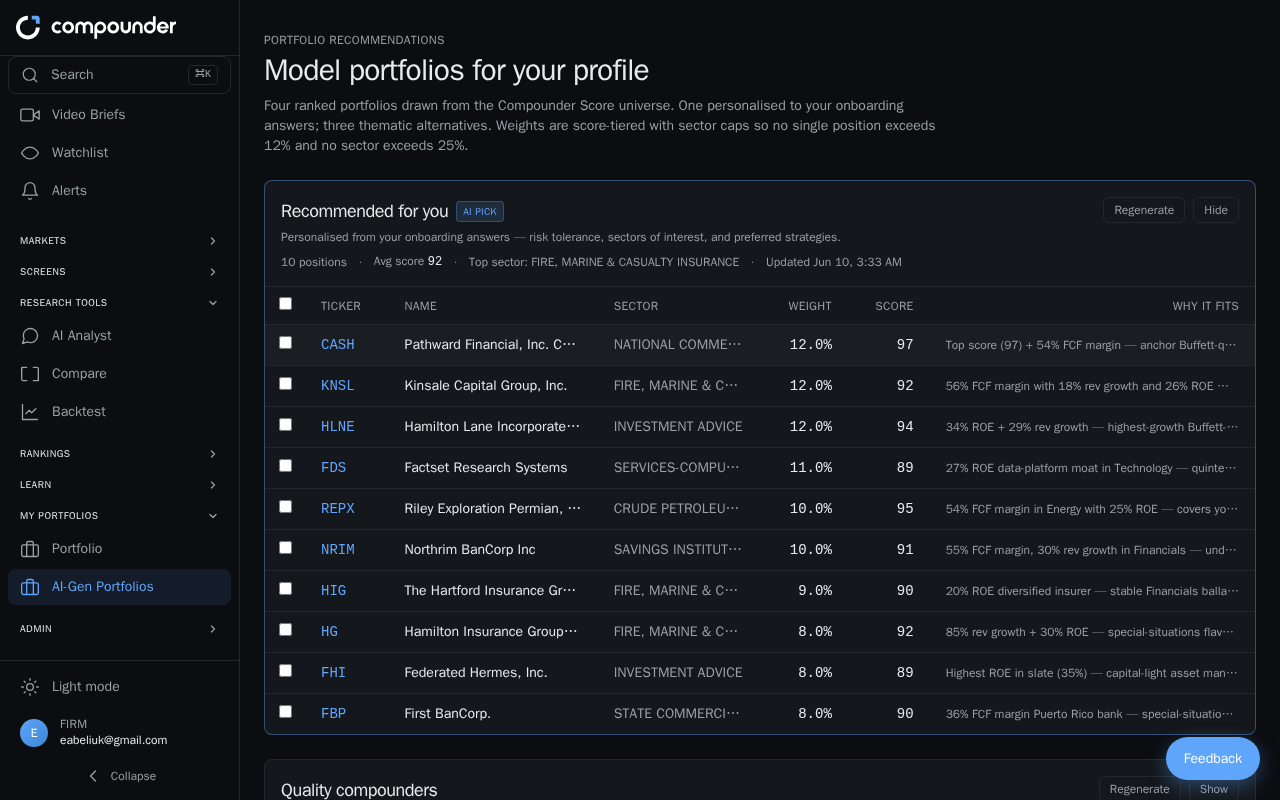
What Are Portfolio Recommendations?
The Portfolio Recommendations section gives you four ready-made model portfolios to explore, each built around a distinct investment theme. These are research tools designed to help you discover stocks — they are not financial advice.
- Recommended for you — A personalized portfolio built from your onboarding answers (risk tolerance, preferred sectors, and investment strategies). This portfolio only appears after you complete the onboarding questionnaire.
- Quality compounders — Companies with strong fundamentals, high profitability, low debt, and steady cash flow.
- Income — Companies with strong cash flow and dividend track records.
- High growth — Fast-growing companies with higher potential returns and higher risk.
On your first visit, all four portfolios are generated fresh, which takes around 10–15 seconds. After that, results are saved so subsequent visits load immediately. Each portfolio displays the date it was last generated.
Opening a Portfolio
- Select Portfolio Recommendations from the main menu.
- You'll see four portfolio cards. Click any card to open it.
- Inside, you'll find an overview pitch, key metrics (number of stocks, average quality score, top sector, estimated return, volatility, and Sharpe ratio), and a full holdings table.
Reviewing Holdings
The holdings table lists each stock's company name, ticker, sector, portfolio weight, quality score, key fundamentals, and a brief rationale for its inclusion. No single stock exceeds 12% of a portfolio, and no single sector exceeds 25% — this is how the weighting is structured by default.
To dig deeper into any stock, click its row in the table. You'll see a full explanation of why it was included along with detailed metrics.
Switching Weighting Methods (Recommended Portfolio Only)
If you're viewing the Recommended for you portfolio and the underlying data is rich enough, you can toggle between two weighting methods:
- Score-based — Stocks are weighted according to their quality score.
- Risk-parity — Weights are balanced so that each stock contributes more equally to overall portfolio risk.
Switching between these views lets you see how the portfolio composition changes under each approach. This toggle is only available on the Recommended portfolio, and only when there is sufficient data.
Refreshing a Portfolio
If market conditions have changed significantly since a portfolio was last generated, you can click Regenerate to refresh its holdings based on the latest data.
Adding Stocks to Your Watchlist
- Check the box next to any stock row to select it, or click Select all to select every stock in the portfolio at once.
- Once at least one stock is selected, an action bar appears at the bottom of the screen.
- Click Add to watchlist in the action bar to bulk-add all selected stocks to your watchlist.
- To start over, click Clear selection to deselect everything.
You can mix and match — select a few individual stocks from one portfolio, then navigate to another and add more before confirming. This makes it easy to build a watchlist from themes that interest you.